Writing the Email Was Easy. Tracking the Outreach Was Harder.
Using ChatGPT across agency research, Gmail and Google Sheets showed me why an email draft needs a clear status, an evidence source and a next action.
I have been using ChatGPT to research potential agency contacts, prepare outreach emails and keep a Google Sheets tracker updated. The work spans research, Gmail drafts, approved sends and later checks. Some approaches need a form or another email account.
One prospect had a Gmail draft but still needed work examples checked. Another was under eligibility review. Neither was recorded as sent. A finished email did not tell me whether the approach was ready to proceed.
The useful record needed to show what had happened, what supported that status and what to do next. Writing the message was only one part of that work.
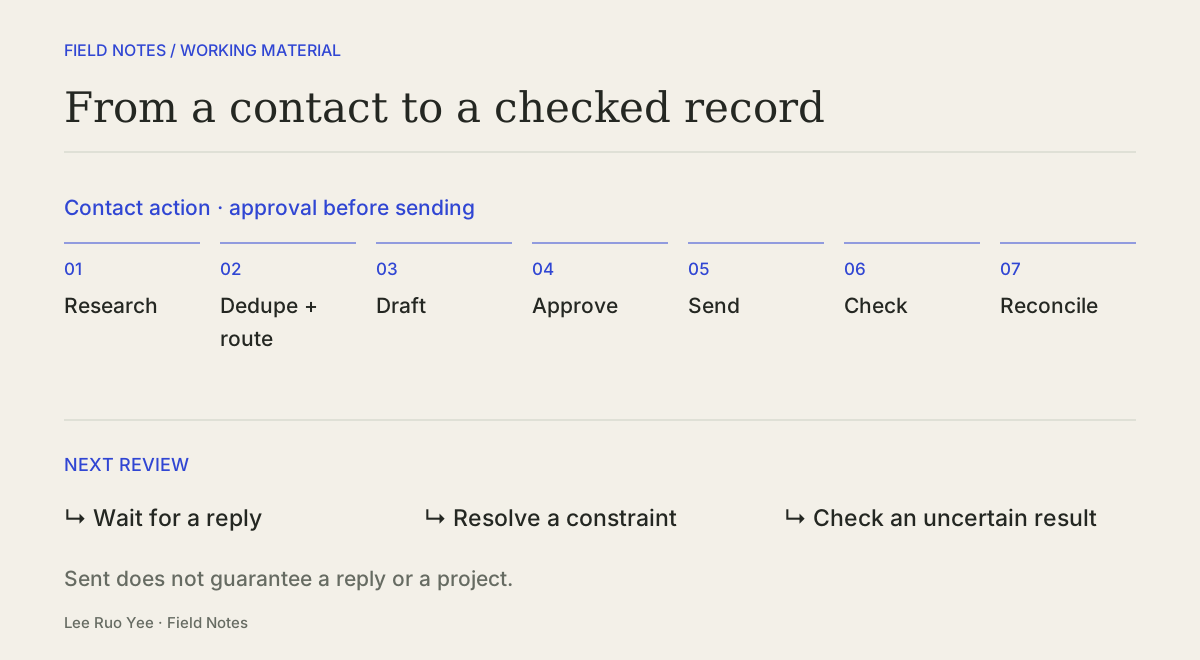
FROM A POSSIBLE CONTACT TO A CHECKED RECORD
Contact action
- 01Research
- 02Dedupe + route
- 03Draft
- 04Approve
- 05Send
- 06Check
- 07Reconcile
- Wait for a reply
- Resolve a constraint
- Check an uncertain result
Separate the action, the response and the opportunity
The current tracker separates outreach status from pipeline stage: what happened to the contact attempt, and where the possible working relationship stands.
For a reusable version, I would review three questions separately: was the message sent, has a response been checked, and is there an opportunity to discuss? Each answer would keep its evidence source alongside it. The model below is a proposed refinement of the tracker.
THREE QUESTIONS, WITH EVIDENCE ALONGSIDE
- 01
Contact action
What happened to the message or submission?
Draft created, awaiting review; sent; not submitted; outcome uncertain
- 02
Observed response
Has a response been checked, and what was found?
Not checked; no reply observed; reply received
- 03
Opportunity stage
Where does the possible working relationship stand?
Eligibility review; contacted; talent pool; qualified project brief
Evidence source
What supports the recorded state?
Gmail record; user confirmation from another account; not yet established
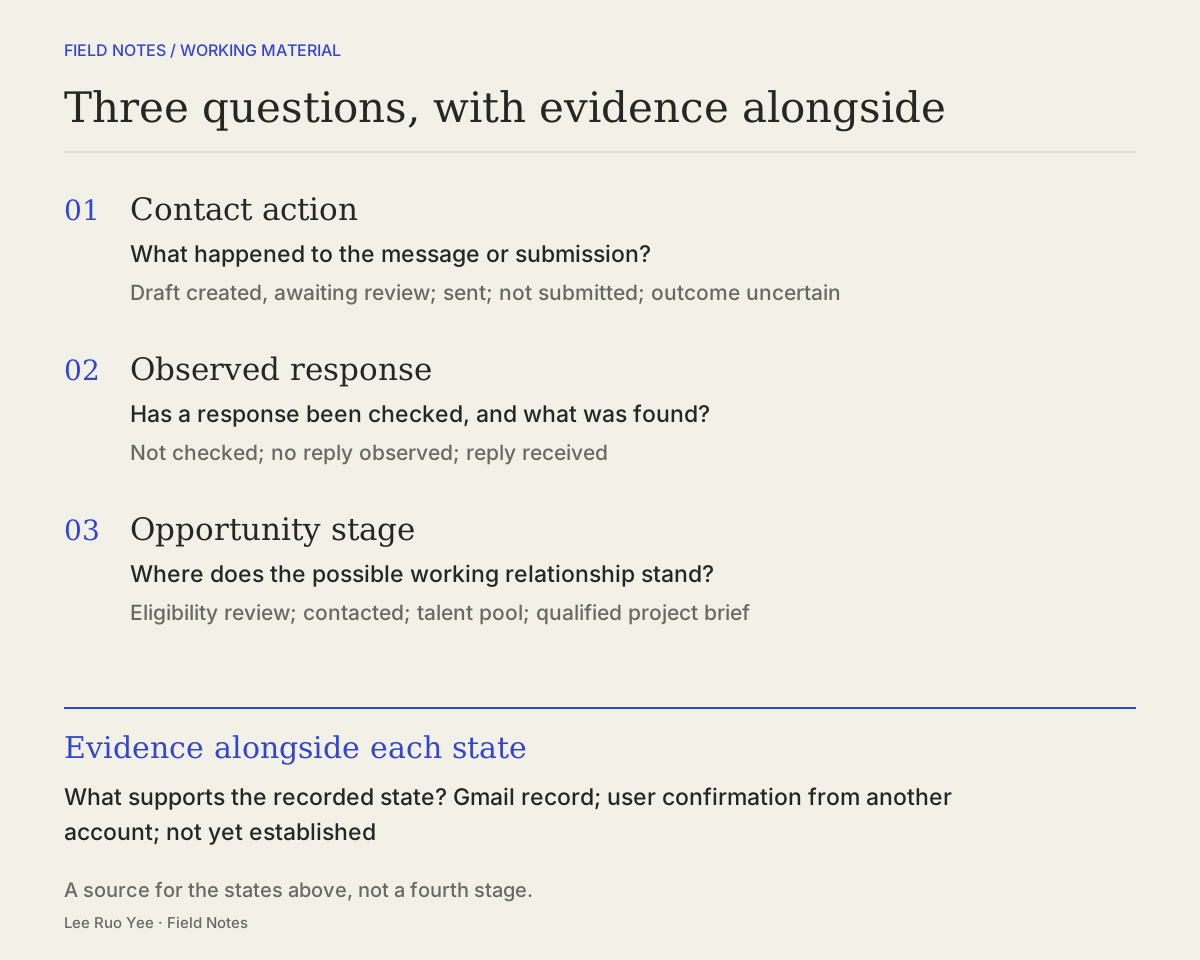
Gmail showing a message in Sent supports a sending record. It does not establish delivery, reading, interest or a qualified project. A reply may still be about eligibility rather than a project to quote.
A daily task can finish while the opportunity stays open. Sending an approved message and checking its record may leave waiting for a reply as the appropriate next action.
Check the contact route before proceeding
Before generating another draft, I would check whether the prospect had already been contacted and which contact route the agency accepted.
An approach may require a form, work examples, an attachment or confirmation of eligibility. A published email address does not settle all those conditions.
One agency replied by directing me to its public supplier policy, which required correspondence from an email address on a domain controlled by the contractor. The policy's effective date was before my initial contact; this was an existing requirement to account for.
I confirmed sending a later email from another account. That send and its exact date had not been independently checked through the connected Gmail account. The tracker retained that qualification, distinguishing my confirmation from a checked Gmail record.
Make the record usable at the next review
A check on 18 October 2026 compared two Gmail Sent records with their tracker entries. Both entries showed Sent and a pipeline stage of Contacted. Here, Sent described the email action; Contacted described the relationship stage. Neither status established a reply or a qualified project.
For those two records, the next action was to check for a reply or bounce at the next review. Another initial approach would not have been the appropriate next step.
For a reusable format, I would keep the current state, its evidence source and the next action together. I would also add a stable prospect identifier, a reference to the relevant contact action and the time it was checked.
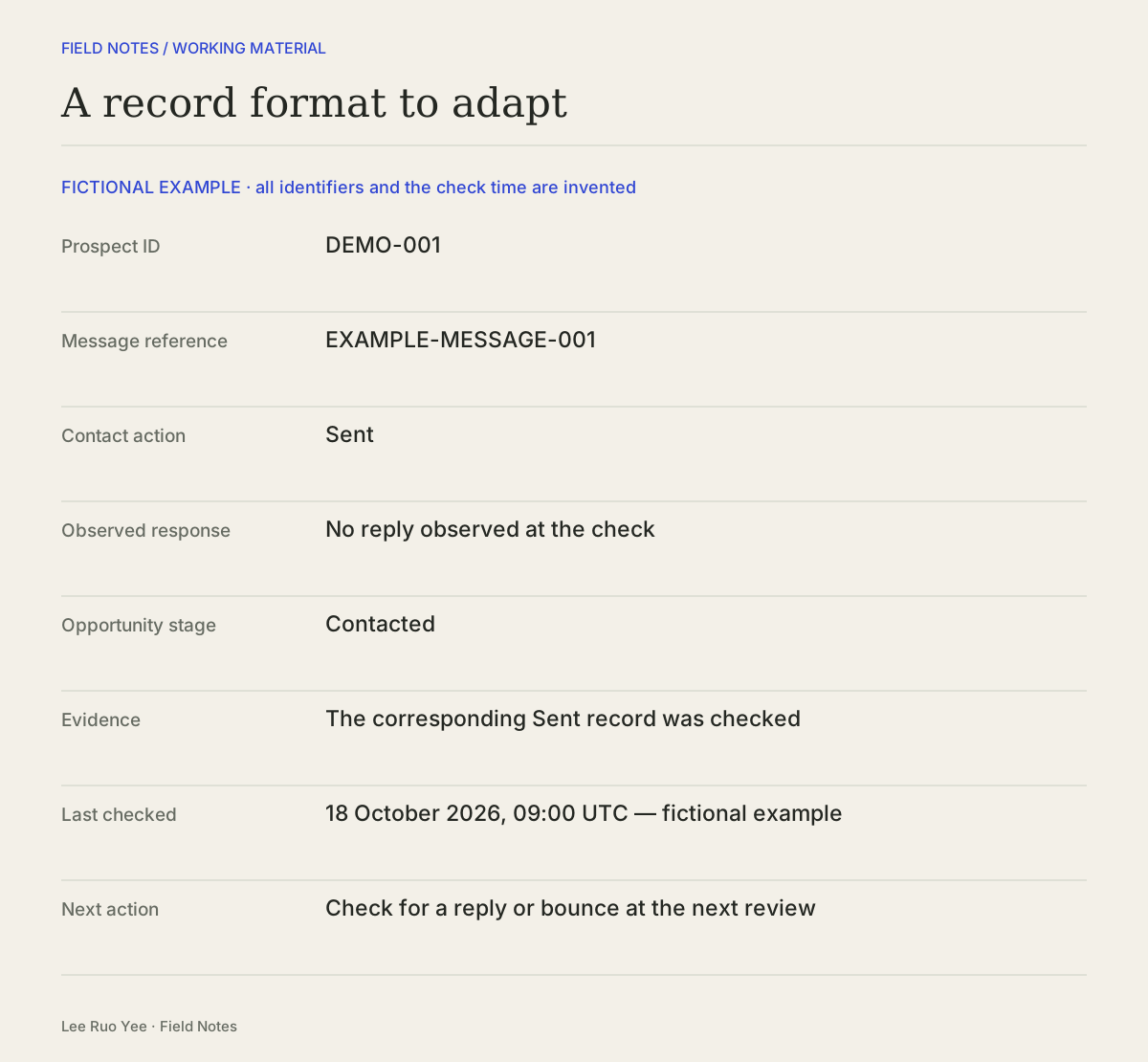
A prospect ID connects the work for one prospect. A message reference identifies a particular email. Keeping both would allow several contact actions while preserving which email a piece of evidence supports. The example below is fictional, including its identifiers and check time.
FICTIONAL EXAMPLE · PROPOSED FORMAT
A record format to adapt
The record below is entirely fictional, including its identifiers and check time. It demonstrates a proposed format, rather than a live tracker export.
- Prospect ID
- DEMO-001
- Message reference
- EXAMPLE-MESSAGE-001
- Contact action
- Sent
- Observed response
- No reply observed at the check
- Opportunity stage
- Contacted
- Evidence
- The corresponding Sent record was checked
- Last checked
- 18 October 2026, 09:00 UTC — fictional example
- Next action
- Check for a reply or bounce at the next review
My product-data automation note focuses on when a workflow should stop for review. This case adds a question for the next review: what actually happened to this contact attempt?
For an outreach record, I would keep the prospect, the specific action, the evidence and the next step together. If I could not tell whether an email was sent, the next step would be to verify that action before preparing another approach.