Projects.

Websites, measurement and workflows.
Find the contribution that matters to you.

Client work is shown through anonymised reconstructions and process views. Sample data and this portfolio’s live implementation are labelled separately.

18 projects

Selected work06

BUILDLiquid · Metafields · Responsive QA

Shopify Storefront Enhancements — Liquid, Metafields & Mobile UX

Built and shipped Shopify theme enhancements using Liquid, JavaScript, CSS, JSON templates, theme sections and metafields, with responsive QA, debugging and release checks within a wider ecommerce team.

Approximately 7–10 live Shopify enhancements.

RECONSTRUCTION · Fictional product and content

Studio ObjectsTHE EVERYDAY COLLECTION

Collection / Desk essentials

STUDIO OBJECTS / 01

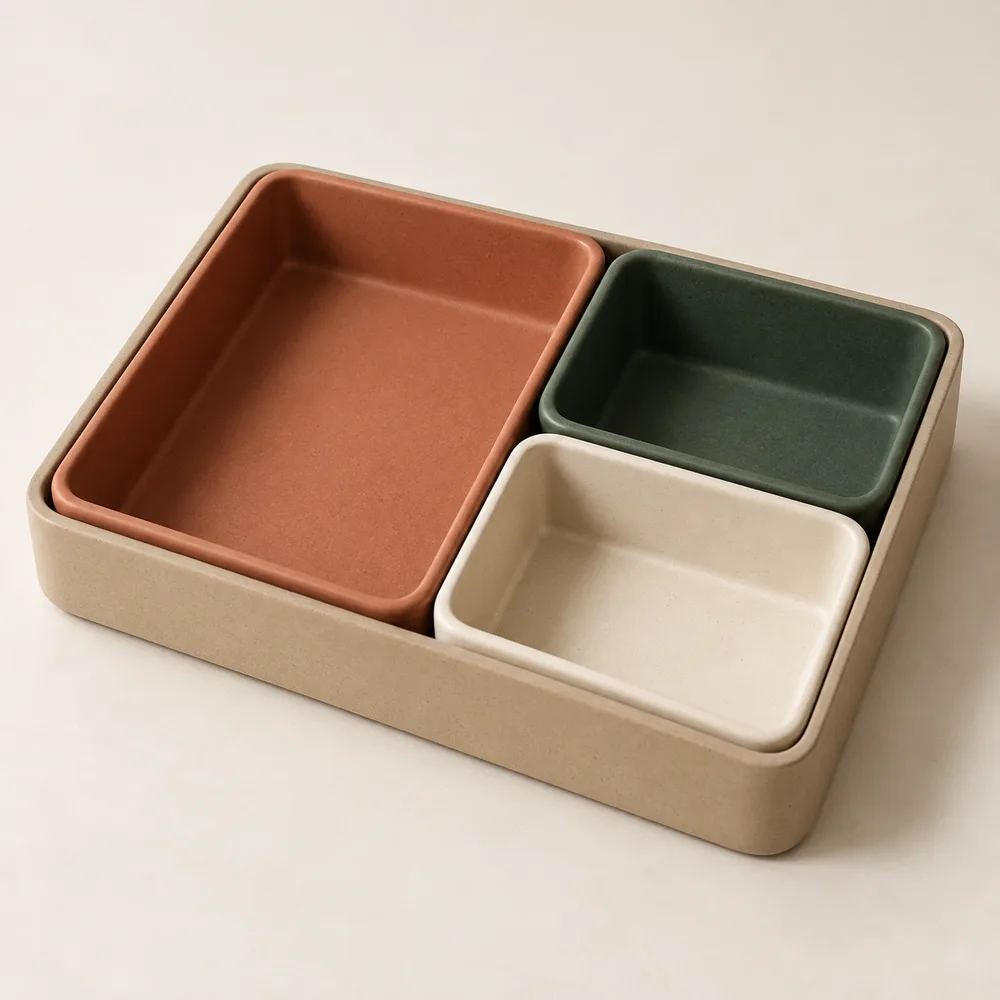
Modular desk organiser

$48.00

A place for your everyday essentials. Three movable compartments, one considered arrangement.

Clay / Forest / Sand

1

Fictional product and price · Local demo only

Everything in its place.

Keep the pieces together on the tray or arrange them around your desk. The long compartment holds pens and pencils; the two smaller trays make room for little essentials.

  • Three removable compartments
  • A low tray with softly rounded edges
  • A matte finish in three complementary colours
Dimensions
30 × 20 cm
Material
Ceramic
Includes
One tray, three compartments
Care
Wipe with a soft cloth
Can I move the compartments?

Yes. Lift out each compartment to arrange it separately.

What fits in the organiser?

Pens in the long compartment; clips, keys and other small essentials in the two shorter trays.

Return & Refund

Sample policy: request a return within 14 days of delivery. This demonstration does not accept orders or returns.

Shopify Storefront Enhancements — Liquid, Metafields & Mobile UX

RECONSTRUCTION · Fictional product and content

Studio ObjectsTHE EVERYDAY COLLECTION

Collection / Desk essentials

STUDIO OBJECTS / 01

Modular desk organiser

$48.00

A place for your everyday essentials. Three movable compartments, one considered arrangement.

Clay / Forest / Sand

1

Fictional product and price · Local demo only

Everything in its place.

Keep the pieces together on the tray or arrange them around your desk. The long compartment holds pens and pencils; the two smaller trays make room for little essentials.

  • Three removable compartments
  • A low tray with softly rounded edges
  • A matte finish in three complementary colours
Dimensions
30 × 20 cm
Material
Ceramic
Includes
One tray, three compartments
Care
Wipe with a soft cloth
Can I move the compartments?

Yes. Lift out each compartment to arrange it separately.

What fits in the organiser?

Pens in the long compartment; clips, keys and other small essentials in the two shorter trays.

Return & Refund

Sample policy: request a return within 14 days of delivery. This demonstration does not accept orders or returns.

RECONSTRUCTION

MEASURETracking · GA4 / GSC · Reporting

GA4/GTM Implementation & Reporting Framework

Implemented GA4/GTM across 20+ client websites and worked on a reporting framework used across 40+ maintenance websites.

Responsibilities varied by site.

PROCESS VIEW

  1. 01Interaction & event specification
  2. 02dataLayer parameters
  3. 03GTM trigger & GA4 event
  4. 04Reproduce, inspect & check reporting
LIVE IMPLEMENTATION / THIS PORTFOLIOgenerate_lead
content_type
contact
content_name
Contact form
source_page
/contact

Triggered after the server accepts the enquiry. Visitor details are excluded.

GA4/GTM Implementation & Reporting Framework

PROCESS VIEW

  1. 01Interaction & event specification
  2. 02dataLayer parameters
  3. 03GTM trigger & GA4 event
  4. 04Reproduce, inspect & check reporting
LIVE IMPLEMENTATION / THIS PORTFOLIOgenerate_lead
content_type
contact
content_name
Contact form
source_page
/contact

Triggered after the server accepts the enquiry. Visitor details are excluded.

PROCESS VIEW · LIVE IMPLEMENTATION

AUTOMATEProduct data · Validation

Multi-Platform Ecommerce Operations Automation

Built and operated an AI-assisted, human-reviewed workflow for preparing and validating product data across Shopify, Shopee, Lazada and TikTok Shop.

250+ SKUs across four platforms.

PROCESS VIEW

Product data to platform templates

  1. Source checkVerify source records

    Match product facts and identifiers. Keep unresolved information visible for review.

  2. AI-assisted preparationPrepare product content

    Prepare titles and descriptions from verified facts; keep internal correction notes out of customer copy.

  3. Template preparationMap platform fields

    Map source fields into each platform template, preserving its headers and expected fields.

  4. ValidationCheck the output

    Review mandatory fields, categories, title length, image links, prices, stock and dimensions against the current template.

  5. Human decisionReview before upload

    Review the prepared files before uploading. A prepared template does not confirm platform acceptance.

Missing facts or template mismatches → correct and recheck before upload.

Multi-Platform Ecommerce Operations Automation

PROCESS VIEW

Product data to platform templates

  1. Source checkVerify source records

    Match product facts and identifiers. Keep unresolved information visible for review.

  2. AI-assisted preparationPrepare product content

    Prepare titles and descriptions from verified facts; keep internal correction notes out of customer copy.

  3. Template preparationMap platform fields

    Map source fields into each platform template, preserving its headers and expected fields.

  4. ValidationCheck the output

    Review mandatory fields, categories, title length, image links, prices, stock and dimensions against the current template.

  5. Human decisionReview before upload

    Review the prepared files before uploading. A prepared template does not confirm platform acceptance.

Missing facts or template mismatches → correct and recheck before upload.

PROCESS VIEW

BUILDCMS · Reusable content

Sitefinity CMS Delivery & Reusable Widget Library

Worked with Sitefinity 13.3 and 14.4, building around 20 reusable widgets for listings, filters, forms, search, accordions, tabs and API-driven content within a delivery team.

Sitefinity 13.3 / 14.4; around 20 reusable widgets.

Sitefinity 13.3 / 14.4

RECONSTRUCTION · Fictional work and people

Work in focus.

SAMPLE COLLECTION

1 of 5: Between the lines

  1. Editor content & widget configuration
  2. Razor / MVC rendering
  3. REST / JSON / SQL where required
  4. Frontend, responsive & regression QA
  5. Release & support

Listings · filters · forms · search · accordions · tabs

Sitefinity CMS Delivery & Reusable Widget Library

Sitefinity 13.3 / 14.4

RECONSTRUCTION · Fictional work and people

Work in focus.

SAMPLE COLLECTION

1 of 5: Between the lines

  1. Editor content & widget configuration
  2. Razor / MVC rendering
  3. REST / JSON / SQL where required
  4. Frontend, responsive & regression QA
  5. Release & support

Listings · filters · forms · search · accordions · tabs

RECONSTRUCTION · PROCESS VIEW

AUTOMATEBUILD / AUTOMATE

WordPress–Zendesk Support Automation

Integrated a multi-category WordPress enquiry form with Zendesk using Contact Form 7, custom PHP, WordPress hooks and the Zendesk REST API.

RECONSTRUCTION · SAMPLE CONTENT

How can we help?

Explore a fictional enquiry. Nothing is sent.

Attachment: sample-document.pdf Illustrative file · no upload

  1. Contact Form 7 → WordPress hook
  2. Custom PHP: prepare & map
  3. Zendesk REST API: search
  4. Existing record → update / new record → create
  5. Exception → stop for review

WordPress–Zendesk Support Automation

RECONSTRUCTION · SAMPLE CONTENT

How can we help?

Explore a fictional enquiry. Nothing is sent.

Attachment: sample-document.pdf Illustrative file · no upload

  1. Contact Form 7 → WordPress hook
  2. Custom PHP: prepare & map
  3. Zendesk REST API: search
  4. Existing record → update / new record → create
  5. Exception → stop for review

RECONSTRUCTION · PROCESS VIEW

MEASURELooker Studio · GA4 · Search Console

Ecommerce & SEO Reporting Dashboard

Built an ecommerce reporting dashboard covering monthly performance, traffic attribution, search performance and the website purchase funnel.

Four reporting views · Synthetic sample data.

Reconstructed dashboard · Sample data for demonstration

Ecommerce performance

Illustrative four-week period · USD

Sessions
1,600
Orders
32
Revenue
$2,560
Purchase rate
2.00%

Weekly revenue

Week 1
$320
Week 2
$640
Week 3
$960
Week 4
$640

Average order value $80

Report architecture reflects confirmed reporting work. All figures, content labels and chart shapes are synthetic; they are not client performance results.

Ecommerce & SEO Reporting Dashboard

Reconstructed dashboard · Sample data for demonstration

Ecommerce performance

Illustrative four-week period · USD

Sessions
1,600
Orders
32
Revenue
$2,560
Purchase rate
2.00%

Weekly revenue

Week 1
$320
Week 2
$640
Week 3
$960
Week 4
$640

Average order value $80

Report architecture reflects confirmed reporting work. All figures, content labels and chart shapes are synthetic; they are not client performance results.

RECONSTRUCTION · SAMPLE DATA

More work12

BUILDBUILD / AUTOMATE

Web Application — Form, PDF & Payment Workflow

Contributed form-data mapping, PDF generation, 2C2P payment integration, retry handling, scheduled status checks, confirmation emails with PDF attachments and UAT as part of a wider team.

Successful, failed and pending payment states were within the contribution scope.

  1. 01 Applicant
  2. 02 Application
  3. 03 Documents
  4. 04 Review

Form → PDF → Payment status → Confirmation

Web Application — Form, PDF & Payment Workflow

RECONSTRUCTION · SAMPLE DATA

Service application

A local application preview. No data is submitted.

  1. 1. Applicant
  2. 2. Application
  3. 3. Documents
  4. 4. Review

Applicant

Form mapping · PDF · Payment status · Confirmation email

RECONSTRUCTION · SAMPLE DATA

Local demonstration. No payment or email is sent.

  • Form-data mapping
  • PDF generation
  • 2C2P payment
  • Pending: scheduled status check / failed: retry
  • Confirmation email + PDF
  • Team UAT
BUILDWordPress · Integration · Launch

Freelance WordPress Delivery — Design-to-CMS, Integrations & Launch Support

Independently delivered 3 responsive WordPress websites from approved Figma/XD designs through implementation, integrations, GA4/GTM setup, performance work and launch support.

  • Approved Figma / XD design
  • Responsive WordPress implementation
  • Integrations & GA4/GTM
  • Performance work
  • Launch support
BUILDBUILD / AUTOMATE

Student Enrolment — Singpass / MyInfo

Supported an enrolment workflow covering Singpass/MyInfo authentication, profile prefill, field mapping, validation, submission, exception handling and UAT.

Contribution within a wider team to an anonymised client workflow.

  • Singpass / MyInfo authentication
  • Profile prefill & field mapping
  • Validation & submission
  • Exception handling
  • Team UAT
BUILDWordPress · Production support

WordPress Security, Performance & Production Support

Supported WordPress security remediation, SSL/HTTPS, performance work, analytics and production troubleshooting as part of the delivery team.

  • Security remediation
  • SSL / HTTPS
  • Performance work
  • Analytics
  • Production troubleshooting
BUILDWordPress · LMS

WordPress LMS Membership Website

Worked on a WordPress LMS and membership implementation using Elementor, MemberPress and LearnPress, including protected course access, quizzes, certificates, responsive QA and deployment support.

  • Elementor / MemberPress / LearnPress
  • Protected course access
  • Quizzes & certificates
  • Responsive QA
  • Deployment support
AUTOMATEOperations · Reconciliation

AI-Assisted Monthly Stock Reconciliation Workflow

Designed an AI-assisted reconciliation workflow for multi-file stock data, including SKU standardisation, matching, calculations, exception handling and human review.

SKU matching, balance calculation and exception review.

AI-Assisted Monthly Stock Reconciliation Workflow

PROCESS VIEW

AI-assisted stock reconciliation

  1. Source checkInspect the source files

    Identify the latest effective opening balance, sales period and available reported stock. Preserve the original files.

  2. AI-assisted preparationMatch product identifiers

    Normalise identifiers against known items and combine duplicate rows without losing the original codes.

  3. CalculationCalculate the balance

    Subtract sales from the effective starting balance. Include only verified stock movements.

  4. ValidationCompare & flag

    Compare with reported stock when available. Flag unmatched items, missing figures and negative balances; do not invent a comparison when only sales are supplied.

  5. Human reviewReview & export

    Review exceptions and check totals, formulas and workbook layout before creating a new dated output.

Unmatched products or unresolved balances → review the source before accepting the result.

PROCESS VIEW

AUTOMATEBUILD / MEASURE / AUTOMATE

Shopify SEO / GEO & Search Readiness

Worked across 100+ Shopify product, collection and information pages on metadata, structured content, FAQs, internal links, schema, redirects and search-readiness QA.

  • Product, collection & information pages
  • Metadata & structured content
  • FAQs & internal links
  • Schema & redirects
  • Search-readiness QA
AUTOMATEShopify · SEO research · Content operations

AI-Assisted Shopify Blog Production & Publishing Workflow

AI-assisted research, drafting, SEO preparation, internal linking and publishing QA for a recurring Shopify blog workflow, with human review before publishing.

Supports approximately 4 posts per week.

AI-Assisted Shopify Blog Production & Publishing Workflow

PROCESS VIEW

AI-assisted Shopify publishing workflow

  1. AI-assisted preparationTopic & source research

    Check the content calendar, search intent and existing articles before preparing a topic.

  2. ValidationProduct verification

    Check source facts, product identity, availability and destination links. Unresolved facts hold the draft.

  3. AI-assisted preparationDraft & structure

    Prepare the answer, comparison, FAQs and product context around the same reader need.

  4. AI-assisted preparationSEO & Shopify formatting

    Prepare metadata, internal links and responsive article HTML without duplicating the page title.

  5. ValidationEditorial & technical QA

    Review copy, factual alignment, images, links, mobile tables and FAQ behaviour.

  6. Human decisionReview & publish

    The reviewed content is handed over for manual publishing. Draft preparation does not publish an article.

  7. Post-publish checkLive-page verification

    Check the live page, metadata, canonical, links and mobile presentation; reconcile the content record.

Unverified facts, unavailable recommendation products or broken links → correct and recheck before publishing.

PROCESS VIEW

MEASUREShopee · Lazada · Inventory

Marketplace Operations & Inventory Analytics

Ran Shopee and Lazada operations covering listings, pricing, promotions, inventory monitoring and sales-led operational decisions.

  • Shopee / Lazada listings
  • Pricing & promotions
  • Inventory monitoring
  • Sales-led operational decisions
MEASUREGA4 · Looker Studio · Traffic · Acquisition · Engagement

GA4 Web Traffic & Performance Dashboard

PORTFOLIO SAMPLE · GOOGLE SAMPLE DATA

Looker Studio dashboard using Google sample data for GA4 traffic, acquisition and engagement reporting.
MEASUREGA4 · Looker Studio · Ecommerce Funnel · AOV · Revenue · Segmentation

GA4 Ecommerce Executive Dashboard

PORTFOLIO SAMPLE · GOOGLE SAMPLE DATA

Looker Studio dashboard using Google sample ecommerce data to present funnel, AOV, revenue and segmentation views.

The figures shown are demonstration data, not client performance results.

GA4 Ecommerce Executive Dashboard

Looker Studio portfolio sample using Google sample data.

PUBLIC SAMPLE · GOOGLE SAMPLE DATA

AUTOMATEAI-assisted preparation · Product facts · Human QA

AI-Assisted Instagram Content Production Workflow

AI-assisted Instagram content preparation, product and brand checks, and human review before publishing.

AI-Assisted Instagram Content Production Workflow

PROCESS VIEW

AI-assisted Instagram preparation

  1. Source checkVerified product & brand inputs

    Review current product facts, available approved assets and the relevant content research.

  2. AI-assisted preparationContent angle & asset plan

    Align the proposed angle, visual evidence and caption direction. Expected audience reactions remain hypotheses.

  3. Human decisionApprove the visual plan

    Review the proposed product, angle and visual approach before producing the batch.

  4. AI-assisted preparationVisual & caption preparation

    Use approved assets and prepare copy that matches the product facts and what the image shows.

  5. ValidationFacts, brand & format QA

    Check product fidelity, visual and caption alignment, dimensions and the delivery package.

  6. Output for human reviewReview-ready handoff

    Deliver the reviewed images and copy. The publisher makes the publishing decision; the workflow does not post to Instagram.

Missing approved assets, uncertain product facts or failed visual checks → hold the affected content for correction.

PROCESS VIEW

TRACE

Capture stopped

Local only · clears on refresh

Earlier records remain until cleared or refreshed.

0 interactions recorded

Capture stopped. Turn TRACE on to record approved interactions.